講到接 LLM,大家第一個想到的通常是 OpenAI 或 Gemini 的 API,第二個想到的是「所以要用 Python 吧」。
這兩件事其實都不一定。模型可以跑在自己的電腦上,語言也可以是 C#。
在本機跑有幾個很實際的好處:使用者打的句子不會送到別人家的伺服器(做企業內部系統時這點常常是關鍵)、沒有用量帳單、也不用擔心對方哪天改 API 或漲價。代價是你得自己準備機器,而且模型比不上最頂的那幾個。
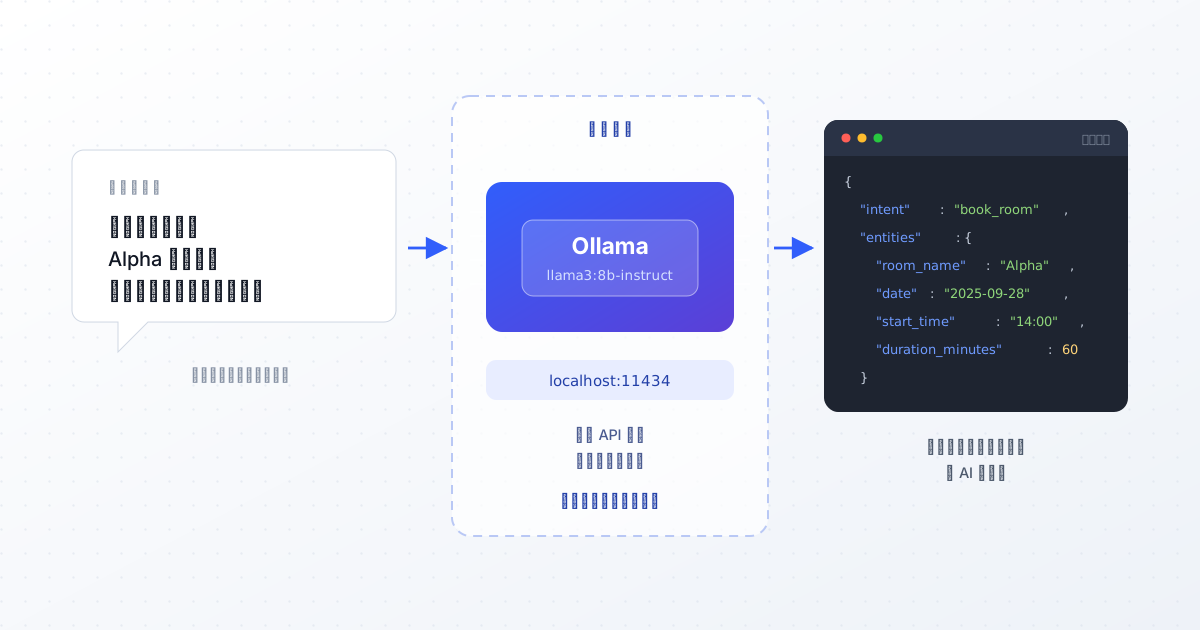
這篇是我拿 .NET Core MVC 接本機 Ollama 做的一個小原型:會議室預約助理。目標是把
幫我預約明天的 Alpha 會議室,從下午兩點開始用一個小時
這種句子,變成程式能直接處理的 JSON。
先準備環境
.NET SDK 6.0 以上
Ollama,裝完會在背景跑一個服務
一個模型,我用的是 Llama 3 的 8B 量化版:
ollama run llama3:8b-instruct-q4_K_M
量化版的好處是一般筆電就跑得動,記憶體吃得不多,速度也還可以接受。
這個原型要 AI 做的事
其實只有兩件:
意圖辨識:這個人想幹嘛?預約、查詢,還是取消?
實體擷取:把關鍵資訊抓出來,會議室、日期、時間、時長。
然後回一包乾淨的 JSON 給我:
{
  "intent": "book_room",
  "entities": {
    "room_name": "Alpha 會議室",
    "date": "2025-09-28",
    "start_time": "14:00",
    "duration_minutes": 60
  }
}
拿到這個之後,剩下的就是一般的 C# 程式了,查空檔、寫資料庫、回傳結果,跟 AI 一點關係都沒有。AI 只負責把自然語言翻成結構化資料這一段。
開始寫
步驟 1:開專案
# 建立一個名為 OllamaBookingDemo 的新 MVC 專案
dotnet new mvc -n OllamaBookingDemo

cd OllamaBookingDemo

# 加入 Newtonsoft.Json,處理 JSON 方便一點
dotnet add package Newtonsoft.Json
步驟 2:定義資料模型
Ollama 的請求跟回應各一組,再加上我們自己要的預約結果。
Models/OllamaRequest.cs
using Newtonsoft.Json;
using System.Collections.Generic;

namespace OllamaBookingDemo.Models
{
    public class OllamaRequest
    {
        [JsonProperty("model")]
        public string Model { get; set; }

        [JsonProperty("messages")]
        public List<OllamaMessage> Messages { get; set; }

        [JsonProperty("format")]
        public string Format { get; set; }

        [JsonProperty("stream")]
        public bool Stream { get; set; }
    }

    public class OllamaMessage
    {
        [JsonProperty("role")]
        public string Role { get; set; }

        [JsonProperty("content")]
        public string Content { get; set; }
    }
}
Models/OllamaResponse.cs
using Newtonsoft.Json;

namespace OllamaBookingDemo.Models
{
    public class OllamaResponse
    {
        [JsonProperty("message")]
        public OllamaMessage Message { get; set; }
        // 其他欄位用不到就先不接
    }
}
Models/BookingIntent.cs
using Newtonsoft.Json;

namespace OllamaBookingDemo.Models
{
    public class BookingIntent
    {
        [JsonProperty("intent")]
        public string Intent { get; set; }

        [JsonProperty("entities")]
        public BookingEntities Entities { get; set; }
    }

    public class BookingEntities
    {
        [JsonProperty("room_name")]
        public string RoomName { get; set; }

        [JsonProperty("date")]
        public string Date { get; set; }

        [JsonProperty("start_time")]
        public string StartTime { get; set; }

        [JsonProperty("duration_minutes")]
        public int? DurationMinutes { get; set; }
    }
}
DurationMinutes 用可為 null 的 int?,因為使用者很可能沒講時長。
步驟 3:呼叫 Ollama 的服務
這是整個原型的核心。
using System;
using System.Collections.Generic;
using System.Net.Http;
using System.Text;
using System.Threading.Tasks;
using Newtonsoft.Json;
using OllamaBookingDemo.Models;

namespace OllamaBookingDemo.Services
{
    public interface IOllamaService
    {
        Task<BookingIntent> GetBookingIntentAsync(string userInput);
    }

    public class OllamaService : IOllamaService
    {
        private readonly HttpClient _httpClient;
        private const string ModelName = "llama3:8b-instruct-q4_K_M";
        private const string OllamaApiUrl = "http://localhost:11434/api/chat";

        public OllamaService(HttpClient httpClient)
        {
            _httpClient = httpClient;
        }

        public async Task<BookingIntent> GetBookingIntentAsync(string userInput)
        {
            // 注意:verbatim string 裡面的雙引號要打兩次
            string systemPrompt = $@"
你是一位專業的會議室預約助理。你的任務是分析使用者的輸入,並抽取出會議預約所需的資訊。
你必須只回傳一個合法的 JSON 物件,不能包含任何額外的說明或文字。
這個 JSON 物件必須包含兩個欄位:""intent"" 和 ""entities""。
可能的 intent 包含:""book_room""、""query_booking""、""cancel_booking""、""unknown""。
""entities"" 物件需要包含的資訊有:""room_name""、""date""、""start_time""、""duration_minutes""。
今天的日期是 {DateTime.Today:yyyy-MM-dd}。
如果有缺漏的資訊,請將對應值設為 null。
";

            var requestPayload = new OllamaRequest
            {
                Model = ModelName,
                Messages = new List<OllamaMessage>
                {
                    new OllamaMessage { Role = "system", Content = systemPrompt },
                    new OllamaMessage { Role = "user", Content = userInput }
                },
                Format = "json", // 讓 Ollama 保證吐出合法 JSON
                Stream = false
            };

            var jsonPayload = JsonConvert.SerializeObject(requestPayload);
            var content = new StringContent(jsonPayload, Encoding.UTF8, "application/json");

            var response = await _httpClient.PostAsync(OllamaApiUrl, content);
            response.EnsureSuccessStatusCode();

            var responseString = await response.Content.ReadAsStringAsync();
            var ollamaResponse = JsonConvert.DeserializeObject<OllamaResponse>(responseString);

            // AI 回的 content 本身是一段 JSON 字串,要再拆一次
            if (ollamaResponse?.Message?.Content != null)
            {
                var bookingIntent = JsonConvert.DeserializeObject<BookingIntent>(ollamaResponse.Message.Content);
                return bookingIntent;
            }

            return null;
        }
    }
}
有兩個地方值得多講幾句。
System Prompt 就是規格書。 你要把「你是誰、要做什麼、只准回 JSON、欄位有哪些、缺資料怎麼辦」全部講清楚。模糊的指令換來模糊的輸出,這件事跟寫需求給人做沒兩樣。
Format = "json" 別忘了。 這是 Ollama 內建的功能,開下去它會保證回傳合法 JSON。少了這行,模型很愛在 JSON 前後加一句「好的,這是您要的資料:」,然後你的反序列化就炸了。
步驟 4:註冊服務
using OllamaBookingDemo.Services;

var builder = WebApplication.CreateBuilder(args);

builder.Services.AddControllersWithViews();

// 註冊 HttpClient 和 OllamaService
builder.Services.AddHttpClient();
builder.Services.AddScoped<IOllamaService, OllamaService>();

var app = builder.Build();
app.Run();
步驟 5:Controller 和畫面
Controllers/HomeController.cs
using System.Threading.Tasks;
using Microsoft.AspNetCore.Mvc;
using OllamaBookingDemo.Models;
using OllamaBookingDemo.Services;

namespace OllamaBookingDemo.Controllers
{
    public class HomeController : Controller
    {
        private readonly IOllamaService _ollamaService;

        public HomeController(IOllamaService ollamaService)
        {
            _ollamaService = ollamaService;
        }

        public IActionResult Index()
        {
            return View();
        }

        [HttpPost]
        public async Task<IActionResult> ProcessQuery(string query)
        {
            BookingIntent result = null;
            if (!string.IsNullOrWhiteSpace(query))
            {
                result = await _ollamaService.GetBookingIntentAsync(query);
            }

            ViewBag.Query = query; // 把原本打的字帶回去,不然畫面會清空
            return View("Index", result);
        }
    }
}
Views/Home/Index.cshtml
@model OllamaBookingDemo.Models.BookingIntent
@{
    ViewData["Title"] = "會議室預約助理";
}

<div class="text-center">
    <h1 class="display-4">會議室預約 AI 助理</h1>
    <p>用平常講話的方式輸入就好</p>
</div>

<div class="row">
    <div class="col-md-8 offset-md-2">
        <form asp-action="ProcessQuery" method="post">
            <div class="form-group">
                <textarea name="query" class="form-control" rows="3" placeholder="例如:幫我預約明天的 Alpha 會議室,從下午兩點開始用一個小時">@ViewBag.Query</textarea>
            </div>
            <br />
            <div class="form-group text-center">
                <button type="submit" class="btn btn-primary">送出</button>
            </div>
        </form>
    </div>
</div>

@if (Model != null)
{
    <hr />
    <div class="row mt-4">
        <div class="col-md-8 offset-md-2">
            <h3>AI 解析結果:</h3>
            @if (Model.Intent != "unknown" && Model.Entities != null)
            {
                <div class="card">
                    <div class="card-header">
                        <strong>意圖:</strong> @Model.Intent
                    </div>
                    <ul class="list-group list-group-flush">
                        <li class="list-group-item"><strong>會議室:</strong> @(Model.Entities.RoomName ?? "未指定")</li>
                        <li class="list-group-item"><strong>日期:</strong> @(Model.Entities.Date ?? "未指定")</li>
                        <li class="list-group-item"><strong>開始時間:</strong> @(Model.Entities.StartTime ?? "未指定")</li>
                        <li class="list-group-item"><strong>時長 (分鐘):</strong> @(Model.Entities.DurationMinutes?.ToString() ?? "未指定")</li>
                    </ul>
                </div>
            }
            else
            {
                <div class="alert alert-warning">
                    看不懂這句話,換個說法試試看。
                </div>
            }
        </div>
    </div>
}
跑起來
確認 Ollama 在背景跑著,然後 dotnet run,打開瀏覽器輸入那句「幫我預約明天的 Alpha 會議室,從下午兩點開始用一個小時」,就會看到解析結果。
幾個實作時卡住的地方
一、JSON 要拆兩次
這是最容易踩的坑。Ollama 回給你的是一包 JSON 沒錯,但你要的 JSON 是包在 message.content 這個字串欄位裡面的。
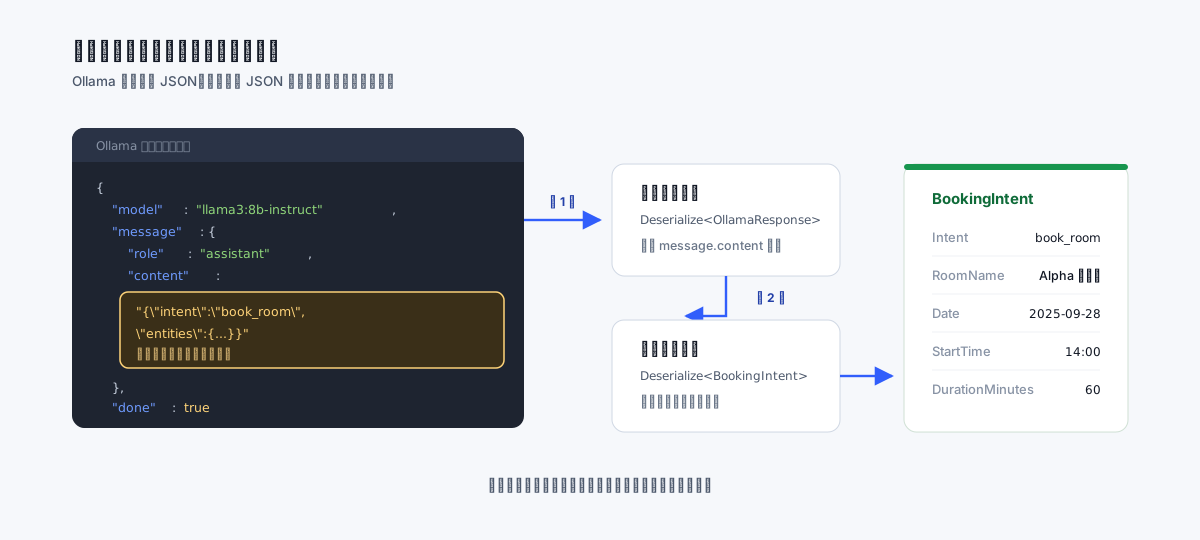
所以要反序列化兩次:先拆外層的信封拿到 content 字串,再把那個字串當 JSON 拆一次,才會得到 BookingIntent。第一次寫的時候我在這裡卡了一陣子,因為型別看起來都對,就是拿不到東西。
二、verbatim string 裡的引號要打兩次
System Prompt 裡面滿滿都是 "intent" 這種帶引號的欄位名,而 C# 的 @"..." 裡面遇到一個 " 就會當作字串結束。所以裡面每個引號都要打兩次寫成 ""intent"",不然連編譯都過不了。
三、今天是幾號,要動態帶進去
模型不知道今天幾號,所以 prompt 一定要告訴它,不然「明天」它算不出來。但這個日期不能寫死,我用 $@"..." 的字串插值把 DateTime.Today 帶進去。寫死的話,這支程式第二天就開始給錯答案了。
之後可以再做的
這只是個能動的原型,離能上線還有一段距離。比較實際的下一步大概是:
把解析結果接到資料庫,真的去查會議室有沒有空
補錯誤處理。Ollama 沒開、模型還沒下載完、回傳的 JSON 欄位缺一半,這些都要擋
等待的時候給個 Loading。本機模型第一次跑要暖機,可能要好幾秒
資訊不齊的時候反問一句「請問是哪一天?」,而不是直接回「看不懂」
不過就算只做到這裡,我覺得已經足夠說明一件事:LLM 不是只能拿來聊天,把它當成「自然語言翻成結構化資料」的工具,是最容易在既有系統裡找到位置的用法。而且這件事,本機的小模型就做得很好了。